This is a part of The Complete Guide to Make your Own WordPress Theme
A basic wordpress theme should have a header, navigation menu, content, sidebar and footer. This is illustrated in the image below:
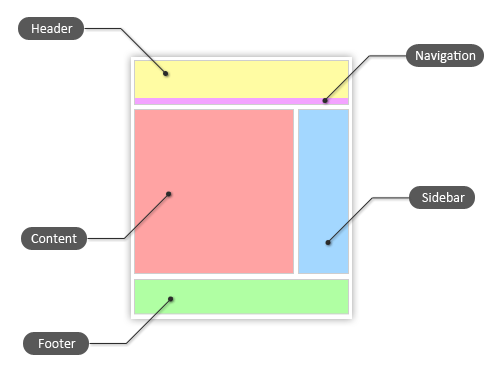
Here lies your logo and usually, page or category navigation menu, and search box. It is also a common practive that google ads were placed here, so leave some space in the design to fit in the ads.
You should make 2 seperate design for the content area:
A sidebar should display important resources like category, recent posts, recent comment, blog roll and more. Some themes also put a search box at sidebar.
Here lies the copyright (eg: © 2009 zenverse , Powered by WordPress) and link back to theme author.
Of course, you do not have to follow this old style. What we have discussed above is a very basic & plain theme. You can be creative, change their position, add more features and make your theme special. We will discuss the features you can add to your theme later.


Hey there, welcome to ZenVerse Blog!
I blog about stuffs that I am interested in, from Web Design & Development to WordPress Themes & Tips, SEO, Creative Inspirations, Google, Mac OS and Android OS.
While my online working environment is focused mainly on Wordpress, I make free wordpress themes, premium wordpress themes and wordpress plugins. Besides, I give out free downloadable resources to the readers.
· Subscribe to All Updates
· Subscribe to Specific Category Only


ZenVerse is Zen's web journal about web design and development.
Zen is from Malaysia.
More about Zen »




Everything dynamic and very positively! :)
AlexAxe
As i have seen a number of important information here,but i feel i might recommend this kind of webpage to my best pals and relatives
while going through your blog,i got what knowledge i require,thank you
Here have lot of info about wordpress! I consider that especially wordpress is need for the website design. Thanks admin :)